Thursday, April 2, 2009

Simple XNA Progress Bar

I recently needed a dead simple progress bar, where I could give it a display rectangle, min, max, and a value and show me something in game, but couldn't find anything online. I ended up writing it myself, and thought I'd share what I came up with.

My goal was to create a single file I could drop into a project to allow me to draw a progress bar. All the projects I found involved using a texture as a separate file. I knew from a previous project that you could create that texture in-memory using the Texture2D.SetData() function, and that's what I did.

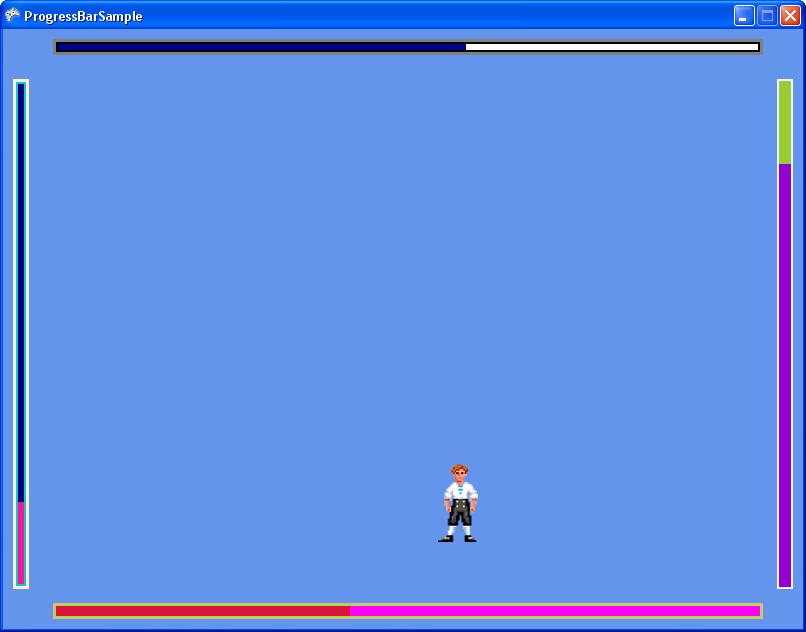
I also wanted to provide a double border so I could put the progress bar on top of any background without having its border look invisible. If you've ever seen closed captioning disappear because of the background color, you know what I mean. But since not everyone needs a double border, I made sure you could turn it off.

Anyways, here's and example of what you can do with the progress bar. (download the project for this at the bottom).


So the simple way to get a progress bar into your game is this:
1. Get the source code.

2. Add ProgressBar.cs to your XNA project. Note that I wrote this in 3.0, so make sure you're on that version or higher.

3. Create an instance of a progress bar in your game1 class;

UI.ProgressBar progressBar;

4. In your LoadContent() function, set it to a new progressBar, and provide the rectangle you want it to lie in. You can also set the minimum, maximum, and value member variables here. The defaults are 0, 100, and 0, respectively.

progressBar = new UI.ProgressBar(this, new Rectangle(10, 10, 300, 16));
progressBar.minimum = 0;
progressBar.maximum= 10000;

5. In your Update() function, update the value of your progress bar if necessary, and then call the progress bar's Update() function, providing the gameTime (gameTime is not currently used in the progress bar code, though).

progressBar.value = character.health;
progressBar.Update(gameTime);

6. In your Draw() function, call progressBar.Draw(), specifying a spriteBatch. Make sure you're already called SpriteBatch.Begin() before calling the progress bar Draw() function.

progressBar.Draw(spriteBatch);

And that's it!

Now, I've put quite a few customizable pieces in there. They are all commented in the progress bar code, in the "public members" region.

The one I'd like to talk about is the orientation. You can specify that the progress bar be vertical or horizontal, and in which direction it fill. This is specified at creation time in the ProgressBar constructor. See the orientation member variable for more info.

Here's a list of the public variables in there now:


float minimum - Minimum value of the progress bar. Default is 0.0f.
float maximum - Maximum value of the progress bar. Default is 100.0f.
float value - Current progress value.

Int32 borderThicknessOuter - Outer border thickness. This is drawn within the bounds of the progress bar. Default is 3.
Int32 borderThicknessInner - Inner border thickness. This is drawn within the bounds of the progress bar. Default is 2.

Color borderColorOuter - Outer border color. Default is Gray.
Color borderColorInner - Inner border color. Default is Black
Color fillColor - Color of the progress section of the bar. Default is Dark Blue.
Color backgroundColor - Color of the background (unfilled) section of the progress bar. Default is White.
Orientation orientation - Gets the orientation of this progress bar. Set at creation time.

Note that you should be careful with the border thickness values. I didn't add any checking to make sure the border isn't overcrowding the actual progress bar. You could theoretically have a progress bar that is all border if you set the thicknesses too big.

Ok, so here's a sample project. Hold space bar if you want to pause.

And here's the bare ProgressBar.cs file (zipped, of course).

Monday, December 8, 2008

QuickTime Player in Internet Explorer

I've recently been working on getting QuickTime player to work in Internet Explorer (and Firefox and Safari), and as you might expect there are some catches to getting a rich QuickTime UI to work with IE. By rich QuickTime UI, I mean a UI you've built yourself that embeds a QuickTime window. Furthermore, to keep your UI updated to the state of the player, you're using DOM events. I thought I'd do a brain dump to refresh my own memory and potentially help some others. So here we go:

Question 1: Why don't my DOM events work in Internet Explorer?

Answer: They work, but they don't work properly, that's for sure. The Apple documentation provides an example the just doesn't work. QuickTime DOM events won't get sent unless you add a [relatively simple] hack, the essence of which requires you to reload the clip you're playing. Pseudocode looks like this (in javascript):

load clip in QuickTime
wait until plugin status is loaded (or complete )

// begin hack
quicktimeMovie.SetResetPropertiesOnReload(false);
quicktimeMovie.setURL(movieURL);
registerDOMEvents(quicktimeMovie);
// end hack

So essentially, you have to generate your object/embed code, load the quicktime player once (by setting innerHTML somewhere), and then do a setURL with the same clip before registering for DOM Events. If you don't do the setURL, you won't get DOM events.

Note that for other browsers you don't have to do this. So I suggest you wrap this code up in an if(IE) block.

Question 2: With the hack above (in IE), why does my app hang when loading long (15 minutes plus) clips?

Answer: Your app is hanging because the QuickTime plugin didn't get time to stabilize before you called setURL. I didn't find a way around this, but a solid solution is to use a dummy clip (1 or 2 seconds of black) that you load up before loading your real clip. Once you've got DOM events registered, you can use setURL to switch to other clips. Pseudocode looks something like this:

function initQuickTime()
{
[code from answer 1 loading a dummy clip]
}

function loadClip(clip)
{
if(firstLoad)
{
initQuickTime();
}
quicktimeMovie.setURL(clip);
}

And you're good to go. setURL can be used from here on in if you need to switch clips.

Other Notes:

1. You can't resize the QuickTime window without reloading the clip. I really want to be wrong about this, but if you need to change the size of the video window, you have to redo your object/embed code. Kind of a pain, but resizing has to be done almost never, so it's workable.

2. If you're writing debug code, make sure all your test clips are on your http server. I made this mistake and wasted a couple hours. If, for example, you're working my pseudocode in question 2 and your dummy clip is on your PC, but your app accesses clips on an http server somewhere, it just won't work. QuickTime player has some initialization in it that defaults to either local files or http files (I don't really know the details).

That's about it. Overall I really like QuickTime player. Compared to the directshow work I've done, it's a lot easier to use. There are a lot less corner cases you have to deal with (if you're trying to get frame accuracy, for example). The compatibility issues in diffferent browsers come with the turf, and they're realtively easy to deal with elegantly if you know what you're up against.

Monday, October 20, 2008

Adobe XFDF

Adobe Xml Forms Data Format is an xml format that allows you to fill PDF forms.  I used this in my D&D character generator to allow for easy creation of a printable character sheet in PDF form.

I started with an editable PDF form.  Each field in an editable form has a name of some sort, and if you have access to Adobe LiveCycle Designer, you can view the fields as XML.  All you have to do is open the editable PDF in LiveCycle Designer and click View->XML Source.  This will give you a long XML list detailing all the fields in your form.

UPDATE 2008-11-13: I got an email from someone recently who was creating his editable form using LiveCycle Designer.  It turns out that if you use LiveCycle Designer to build your form, it won't work with XFDF.  If you want to use XFDF, you have to create the form using Acrobat.  LiveCycle Designer forms require that you use XDP (which I have never used).  You can read a bit more about the incompatibilities here.

To specify the values to go into an editable PDF, you create an XFDF file.  The basic format is this:

<?xml version="1.0" encoding="UTF-8"?>
<xfdf xmlns="http://ns.adobe.com/xfdf/" xml:space="preserve">
<f href="http://www.lukerymarz.com/files/CharacterSheet.pdf"/>
<fields>
  <field name="name">
    <value>null</value>
  </field>
  <field name="level">
    <value>1</value>
  </field>
  <field name="class">
    <value>Warlock</value>
  </field>
  <field name="race">
    <value>Tiefling</value>
  </field>
   ...
   ...
   ...
</fields>
</xfdf>

You put this in a text file with an xfdf extension and when you open it, it will reference the pdf in the <f> field and fill in the specified fields.  

So how do you get from the XML LiveCycle Designer gives you to the actual xfdf data.  Well, I didn't want to type a bunch of repetitive lines for each field in the form, so I wrote a little tool to take the LiveCycle xml and spit out ActionScript.  My tool opens the LiveCycle XML, parses each field, and provides a listing with the field type.  It then converts each field to ActionScript code that will append to a string in a my output function.  All I did then was copy the ActionScript code, fill in the specific piece of data for each field (for example, currentCharacter.name for the "name" field), and the output was done.  

There are two caveats I ran into, and the first has to do with spaces.  For each field, the name of that field in the LiveCycle XML has an underscore where a space is.  In the XFDF XML you generate, those underscores need to be replaced with an actual space, otherwise your field won't get filled in.  

The second caveat has to do with arrays.  For example, a part of the ActionScript code my tool generated looks like this:

xfdf += '<field name="class_feature.0"><value>' + Database.Data.currentCharacter. + '</value></field>';
xfdf += '<field name="class_feature.1"><value>' + Database.Data.currentCharacter. + '</value></field>';
xfdf += '<field name="class_feature.2"><value>' + Database.Data.currentCharacter. + '</value></field>';
xfdf += '<field name="class_feature.3"><value>' + Database.Data.currentCharacter. + '</value></field>';
xfdf += '<field name="class_feature.4"><value>' + Database.Data.currentCharacter. + '</value></field>';
xfdf += '<field name="class_feature.5"><value>' + Database.Data.currentCharacter. + '</value></field>';
xfdf += '<field name="class_feature.6"><value>' + Database.Data.currentCharacter. + '</value></field>';


This is an array of class features.  You'd think you could just go through the list, creating:

  <field name="class feature.0">
    <value>sample feature 1</value>
  </field>
  <field name="class feature.1">
    <value>sample feature 2</value>
  </field>

But that is incorrect.  Since this is an array, you have to represent it as one in the xfdf.  The actual output would look like this:

  <field name="class feature">
    <field name="0">
      <value>Eldritch Blast:</value>
    </field>
    <field name="1">
      <value>Edlritch Pact: Choose Fey Pact, Infernal Pact, or Star Pact.</value>
    </field>
    <field name="2">
      <value>Prime Shot: If you are closest to your target, +1 to attack rolls</value>
    </field>
  </field>

And that's it.  If you reference a pdf on a website, you can send only the xfdf to your user, and as long as they have access to your website, when they open the xfdf, Adobe will take care of the rest.  Pretty neat, once you get past the catches.

Saturday, October 4, 2008

XML schemas, Excel, and getting what you want

In my character generator, there is a lot of data.  There's races, classes, skill, feats, and powers.  On top of that, they're not static lists.  Wizards of the Coast (and other people) are always adding and expanding on everything.  With that in mind, I knew I needed to have all that data extensible in my character generator.  XML is the obvious choice, especially since Flex is so good at parsing it.

But how was I to get the data in the PHB into XML in the easiest way possible?  Microsoft Excel and XML Schemas is the answer.  The basic idea is that you enter all your data into Microsoft Excel as a big list.  Then you tell Excel to export it as XML.  That XML is then fed into the Flex app.  

XML schemas tell Excel how to format the XML you export.  With an XML schema, you're defining the basic format of your XML (in XML, ironically).  There's an article here that gives a good way to create a simple Xml Schema Definition (XSD) using Excel (see step 6, specifically).  That will give you the schema, and then you can attach that to your Excel spreadsheet and have Excel export XML for you.

But there's a HUGE caveat.  Excel cannot handle (that is, export, import, deal with at all) XML with a list of lists.  This looks something like this:

<feats>
  <feat name="a">
    <prerequisites>
      <prerequisite name="x"/>
      <prerequisite name="y"/>
    </prerequisites>
  </feat>
  <feat name="b">
    <prerequisites>
      <prerequisite name="p"/>
      <prerequisite name="q"/>
    </prerequisites>
  </feat>
</feats>

We've got a list of feats, each containing a list of prerequisites.  The issue, specifically, is that we have many elements.  Now, if you think about this, it makes sense.  Excel allows you to easily edit a two dimensional array of data.  More than that and it gets complicated.

The solution I went with to get around this (because I require being able to add and remove from various lists of data, and it makes the XML easier to read) is to make use of the really good XML functionality in Flex.  My solution works like this:

1.  enter you data in Excel.  any time you have a list of things, enter them as a single cell and separate each "thing" with a comma.
2.  export to a simple xml format.
3.  feed the xml into a Flex app that takes the XML and converts any comma separated lists to a proper XML list.

A sample of this is here.  My flex app takes a list of feats I exported from Excel (shown on the left side), and then prints the proper XML for me to save to a file (shown on the right side).  There's now an extra step if I update my Excel spreadsheet, but it's better than having to edit XML all day long.

Unfortunately, I don't know of a way to get Flex to do magic things with XML schemas, so the dream app of being able to give one XML format and export another is still off my radar.  Also, you are effectively writing your XML schema in Flex code, so if you need to make a schema change, it's instead a Flex code change.  This is not necessarily bad.  I feel more comfortable making changes in code instead of in fancy XML schema editors.

Now, I've heard that Altova makes a really nice application that can handle lists of lists, but I haven't tried it (and the price is outside my budget).  Something for next time, I suppose.  For now, I've got a "good enough" solution for tricky XML, and it will be easy to update in the future if I need to.

Saturday, September 20, 2008

Character Generator update

I've updated the Character Builder. I added a changelog that tracks the changes I've made. It's accessible from the About box (click the top right button in the app).

I made a fix for the healing surges not showing up, and I fixed a bug that was keeping humans from getting their bonus skill, feat, and power.

Friday, September 19, 2008

bugs in Generator

There seems to be a bug in the healing surges calculations on the character sheet. I'll take a look sometime this weekend. I'll also look at the character sheet and see if I can get, for example, the damage and attack workspaces to show blank instead of Zero so they can be filled in with a pencil.

Wednesday, September 17, 2008

D&D Character Generator

UPDATE 2009.08.14 - I've posted a new build with PHB 2 races and classes, and a handful of new features. See the details here.

UPDATE 2009.04.01 - You will need Flash 10 to run this now. I've updated the "view as PDF" functionality so it uses the new Flash 10 feature to create files on the fly. It doesn't have to ask my server to create the file anymore. Hooray! I've also changed the size a bit. See the change log in the about box for more info.


Ok. I've FINALLY finished a project I've been working on for the last couple months. I've been giving it about two 4 hour sessions a week, and [AT LAST!] I'm satisfied enough with it to post it.

It's a character generator for Dungeons and Dragons 4th edition. I got the books in July when they released the set, and I thought it would be fun to put together a character generator that made it a bit easier to parse the whole thing.

This bad boy is written in Flex, so you can run it from any web browser with Flash 9. The general idea is that you build your character through the flex interface, and when you're done, click the "View as PDF" button and out pops a nice PDF for you to print out. It DOES NOT replace the Player's Handbook in any way. It's more of an easing function on the whole ordeal.

Use the app here. You'll need Flash 9. Don't forget that you can drag and drop your stat numbers in the Standard Array and Roll entry types. I haven't yet figured out a good way to indicate that they're draggable, as the Flex "useHandCursor" flag doesn't see to work.

Here's a list of caveats / known flaws / things that aren't implemented:

- THIS DOES NOT REPLACE THE PLAYERS HANDBOOK.

- choosing of equipment is not implemented. You'll need to use the PHB after you print your PDF.

- Half-Elf: after creating the PDF, be sure to choose an at-will power from another class for the dilettante race feature.
- Ranger: After creating the PDF, choose Dungeoneering or Nature as a skill. This will affect your modifier for the skill by 5 points, so don't forget!
- There appears to be an error in the class listings in the Player's Handbook. When a skill is automatically given (listed as "free" in my UI), it is also listed as a choice. In my code, I automatically remove the free skills from the choice list.
- I have not implemented languages. choose them on the PDF.
- Human: you get +2 to an ability of your choice. Do this on the PDF.
- The PDF has some fields that automatically fill as Zero. If there are certain ones you think should not be filled at all, let me know and I'll fix them.
- certain class and race features require you to choose between two things. In cases where this is not implemented, it is listed on the character sheet as a "choose x or y" listing under the class/race features sections.

UI bugs:
- there's a minor glitch in the positioning of the strength stat when you drag a number on top of it (only seen in the Roll entry type).
- Powers have no descriptions. They're intended to not have power descriptions, but they're supposed to say "See Player's Handbook".

Note that I got the character sheet pdf I'm currently using from here.

This was a very fun little project. I enjoy writing apps in Flex. In working on this, I learned about XML schemas, XFDF (a pdf format), and some Perl tricks I'm currently using on my server. I'll make some posts soon about all that stuff. I wrote some helper Flex apps that I'll post as well.