I've updated the Character Builder. I added a changelog that tracks the changes I've made. It's accessible from the About box (click the top right button in the app).
I made a fix for the healing surges not showing up, and I fixed a bug that was keeping humans from getting their bonus skill, feat, and power.
Saturday, September 20, 2008

Friday, September 19, 2008
bugs in Generator
There seems to be a bug in the healing surges calculations on the character sheet. I'll take a look sometime this weekend. I'll also look at the character sheet and see if I can get, for example, the damage and attack workspaces to show blank instead of Zero so they can be filled in with a pencil.
Wednesday, September 17, 2008
D&D Character Generator
UPDATE 2009.08.14 - I've posted a new build with PHB 2 races and classes, and a handful of new features. See the details here.
UPDATE 2009.04.01 - You will need Flash 10 to run this now. I've updated the "view as PDF" functionality so it uses the new Flash 10 feature to create files on the fly. It doesn't have to ask my server to create the file anymore. Hooray! I've also changed the size a bit. See the change log in the about box for more info.
Ok. I've FINALLY finished a project I've been working on for the last couple months. I've been giving it about two 4 hour sessions a week, and [AT LAST!] I'm satisfied enough with it to post it.
It's a character generator for Dungeons and Dragons 4th edition. I got the books in July when they released the set, and I thought it would be fun to put together a character generator that made it a bit easier to parse the whole thing.
This bad boy is written in Flex, so you can run it from any web browser with Flash 9. The general idea is that you build your character through the flex interface, and when you're done, click the "View as PDF" button and out pops a nice PDF for you to print out. It DOES NOT replace the Player's Handbook in any way. It's more of an easing function on the whole ordeal.
Use the app here. You'll need Flash 9. Don't forget that you can drag and drop your stat numbers in the Standard Array and Roll entry types. I haven't yet figured out a good way to indicate that they're draggable, as the Flex "useHandCursor" flag doesn't see to work.
Here's a list of caveats / known flaws / things that aren't implemented:
- THIS DOES NOT REPLACE THE PLAYERS HANDBOOK.
- choosing of equipment is not implemented. You'll need to use the PHB after you print your PDF.
- Half-Elf: after creating the PDF, be sure to choose an at-will power from another class for the dilettante race feature.
- Ranger: After creating the PDF, choose Dungeoneering or Nature as a skill. This will affect your modifier for the skill by 5 points, so don't forget!
- There appears to be an error in the class listings in the Player's Handbook. When a skill is automatically given (listed as "free" in my UI), it is also listed as a choice. In my code, I automatically remove the free skills from the choice list.
- I have not implemented languages. choose them on the PDF.
- Human: you get +2 to an ability of your choice. Do this on the PDF.
- The PDF has some fields that automatically fill as Zero. If there are certain ones you think should not be filled at all, let me know and I'll fix them.
- certain class and race features require you to choose between two things. In cases where this is not implemented, it is listed on the character sheet as a "choose x or y" listing under the class/race features sections.
UI bugs:
- there's a minor glitch in the positioning of the strength stat when you drag a number on top of it (only seen in the Roll entry type).
- Powers have no descriptions. They're intended to not have power descriptions, but they're supposed to say "See Player's Handbook".
Note that I got the character sheet pdf I'm currently using from here.
This was a very fun little project. I enjoy writing apps in Flex. In working on this, I learned about XML schemas, XFDF (a pdf format), and some Perl tricks I'm currently using on my server. I'll make some posts soon about all that stuff. I wrote some helper Flex apps that I'll post as well.
UPDATE 2009.04.01 - You will need Flash 10 to run this now. I've updated the "view as PDF" functionality so it uses the new Flash 10 feature to create files on the fly. It doesn't have to ask my server to create the file anymore. Hooray! I've also changed the size a bit. See the change log in the about box for more info.
Ok. I've FINALLY finished a project I've been working on for the last couple months. I've been giving it about two 4 hour sessions a week, and [AT LAST!] I'm satisfied enough with it to post it.
It's a character generator for Dungeons and Dragons 4th edition. I got the books in July when they released the set, and I thought it would be fun to put together a character generator that made it a bit easier to parse the whole thing.
This bad boy is written in Flex, so you can run it from any web browser with Flash 9. The general idea is that you build your character through the flex interface, and when you're done, click the "View as PDF" button and out pops a nice PDF for you to print out. It DOES NOT replace the Player's Handbook in any way. It's more of an easing function on the whole ordeal.
Use the app here. You'll need Flash 9. Don't forget that you can drag and drop your stat numbers in the Standard Array and Roll entry types. I haven't yet figured out a good way to indicate that they're draggable, as the Flex "useHandCursor" flag doesn't see to work.
Here's a list of caveats / known flaws / things that aren't implemented:
- THIS DOES NOT REPLACE THE PLAYERS HANDBOOK.
- choosing of equipment is not implemented. You'll need to use the PHB after you print your PDF.
- Half-Elf: after creating the PDF, be sure to choose an at-will power from another class for the dilettante race feature.
- Ranger: After creating the PDF, choose Dungeoneering or Nature as a skill. This will affect your modifier for the skill by 5 points, so don't forget!
- There appears to be an error in the class listings in the Player's Handbook. When a skill is automatically given (listed as "free" in my UI), it is also listed as a choice. In my code, I automatically remove the free skills from the choice list.
- I have not implemented languages. choose them on the PDF.
- Human: you get +2 to an ability of your choice. Do this on the PDF.
- The PDF has some fields that automatically fill as Zero. If there are certain ones you think should not be filled at all, let me know and I'll fix them.
- certain class and race features require you to choose between two things. In cases where this is not implemented, it is listed on the character sheet as a "choose x or y" listing under the class/race features sections.
UI bugs:
- there's a minor glitch in the positioning of the strength stat when you drag a number on top of it (only seen in the Roll entry type).
- Powers have no descriptions. They're intended to not have power descriptions, but they're supposed to say "See Player's Handbook".
Note that I got the character sheet pdf I'm currently using from here.
This was a very fun little project. I enjoy writing apps in Flex. In working on this, I learned about XML schemas, XFDF (a pdf format), and some Perl tricks I'm currently using on my server. I'll make some posts soon about all that stuff. I wrote some helper Flex apps that I'll post as well.
Friday, May 16, 2008
On Other Projects
I haven't made a post in the last two weeks because I've been working on another top secret project. I'm guessing it will take another two weeks of my time, and then I'll start posting some more stuff here. 'Til then...
Thursday, May 1, 2008
A Custom MFC Control to Display Guitar Chords
Recently, I've tasked myself with learning a bit more about custom MFC controls. For a hands on project, I chose to create a custom MFC control for displaying guitar chords. The basic steps of creating custom MFC controls are this:
1. Create a class for your control, and inherit from a control similar to what you want to make. If nothing is similar, inherit from CStatic.
2. Override the OnPaint function to do your custom drawing.
Everything else is just MFC, although you have to be careful about redrawing. If you're constantly redrawing, you could get a bit of flicker.
To show your control in a dialog, you have do the following:
1. Add a Custom Control to the dialog.
2. Set the "Class" property of the custom control to the name of your custom class.
3. Make sure you register your custom class using the AfxRegisterClass() function. An example of this is in ChordDisplay.cpp.
In making this control, I learned something very important. If you can draw something with the CDC drawing functions, then do it that way. Bitmaps are easy enough to blit onto the Device Context, but if you need transparency or any fancy stuff, you're gonna be spending a good bit of time figuring it out (or searching for code that does what you want). I used 100% CDC drawing functions for my guitar control.
Here's a screenshot:

And, as always, my source code is here. The control can be told to draw a chord by filling a struct with some data. See ChordDatabase.cpp for more how to do that. An expansion of this would be to get a full database of chords that could be loaded from an xml file. I've only got a few chords here because it's just a sample to show the control.
1. Create a class for your control, and inherit from a control similar to what you want to make. If nothing is similar, inherit from CStatic.
2. Override the OnPaint function to do your custom drawing.
Everything else is just MFC, although you have to be careful about redrawing. If you're constantly redrawing, you could get a bit of flicker.
To show your control in a dialog, you have do the following:
1. Add a Custom Control to the dialog.
2. Set the "Class" property of the custom control to the name of your custom class.
3. Make sure you register your custom class using the AfxRegisterClass() function. An example of this is in ChordDisplay.cpp.
In making this control, I learned something very important. If you can draw something with the CDC drawing functions, then do it that way. Bitmaps are easy enough to blit onto the Device Context, but if you need transparency or any fancy stuff, you're gonna be spending a good bit of time figuring it out (or searching for code that does what you want). I used 100% CDC drawing functions for my guitar control.
Here's a screenshot:
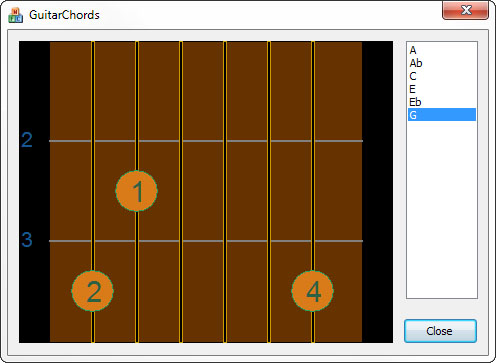
And, as always, my source code is here. The control can be told to draw a chord by filling a struct with some data. See ChordDatabase.cpp for more how to do that. An expansion of this would be to get a full database of chords that could be loaded from an xml file. I've only got a few chords here because it's just a sample to show the control.
Saturday, April 26, 2008
Farseer Physics
I've been playing with the Farseer Physics engine lately. It's a physics engine for XNA and Silverlight. I've been toying with the idea of a game involving spiderman-like web swinging. You have a character, and he can fire a grappling hook from either hand. He the uses this mechanism to swing about. What I've got so far is a box that can fire a single grappling hook and swing about the screen. It's taken me 3 hours or so to get this far (which i think is pretty quick), and I attribute the quick spin-up to how easy the Farseer engine is to use.
The only gripe i have is that it has basically zero documentation. And since this code has been around since 2006, I'm gonna guess no documentation is coming any time soon. The good news is they provide quite a bit of sample code, and the guy who wrote it seems to reply to just about every question people can think of on the codeplex boards.
Either way, i'm having some fun. I'll post some code when I get there.
The only gripe i have is that it has basically zero documentation. And since this code has been around since 2006, I'm gonna guess no documentation is coming any time soon. The good news is they provide quite a bit of sample code, and the guy who wrote it seems to reply to just about every question people can think of on the codeplex boards.
Either way, i'm having some fun. I'll post some code when I get there.
Tuesday, April 8, 2008
Playing with OpenGL - Mouse Interaction
I haven't worked with OpenGL in a long time. The last time I wrote anything using OpenGL was in college when I took a class on it. Well, I recently bought the OpenGL SuperBible, and from reading the first bit of it, it sounds like some interesting stuff has developed. There's now this OpenGL shading language? I don't remember anything about that, at least. There's also a trimmed down version of OpenGL for mobile devices too, and that's really cool.
Anyways, I remember in the class I never ended up with an OpenGL app that would allow for proper mouse rotation of a 3d object. Mouse interaction was never really assigned in that class, and I remember spending a lot of my time trying to figure out the math the teacher was having us do instead.
So I thought now that I'm jumping back into OpenGL related stuff, my first project should be revisiting that very simple, yet often overlooked bit of code that handles mouse interaction. I reviewed some of the code I had written in the class, and it had the basic idea right, but not enough thought put into it.
So I started fresh. I've learned some interesting things:
ROTATION
If you rotate the camera about your scene, then you won't be able to spin a translated object in place (what you get is a big swing around the object, rather than watching the object spin). So it seems one wants to rotate the the whole scene before drawing it. This is, of course, to mimic what is seen in 3ds Max.
TRANSLATION
This is probably the easiest part of the math involved. Since translation from this projects point of view is moving about the screen plane, then we only have to move in two dimensions (The third dimension is zoom). All that needs be done is move our eyeball AND the point we're looking at in parallel.
ZOOM
This one is a bit tricky. The effect we want is to move our eye closer to the point we're looking at. This point is not necessarily the object. Imagine you have an eye location E and a focus point F. Moving our eye towards F involves a little bit of vector math. If we create a vector from E to F, we are half way there. To do that, subtract F from E in each dimension:
Vx = Fx - Ex;
Vy = Fy - Ey;
Vz = Fz - Ez;
Now we simple move our Eye point along this vector. Multiple the vector by some scaling factor and add
newEye = E + V*scale;
or
newEyex = Ex + Vx*scale;
newEyey = Ey + Vy*scale;
newEyez = Ez + Vz*scale;
When you think about the math, it makes sense. When you look at the math, it's easy to get confused.
At any rate, here's my program. I've tried to put it together so you don't need to modify your paths to get it to build (the glut library is included).
Anyways, I remember in the class I never ended up with an OpenGL app that would allow for proper mouse rotation of a 3d object. Mouse interaction was never really assigned in that class, and I remember spending a lot of my time trying to figure out the math the teacher was having us do instead.
So I thought now that I'm jumping back into OpenGL related stuff, my first project should be revisiting that very simple, yet often overlooked bit of code that handles mouse interaction. I reviewed some of the code I had written in the class, and it had the basic idea right, but not enough thought put into it.
So I started fresh. I've learned some interesting things:
ROTATION
If you rotate the camera about your scene, then you won't be able to spin a translated object in place (what you get is a big swing around the object, rather than watching the object spin). So it seems one wants to rotate the the whole scene before drawing it. This is, of course, to mimic what is seen in 3ds Max.
TRANSLATION
This is probably the easiest part of the math involved. Since translation from this projects point of view is moving about the screen plane, then we only have to move in two dimensions (The third dimension is zoom). All that needs be done is move our eyeball AND the point we're looking at in parallel.
ZOOM
This one is a bit tricky. The effect we want is to move our eye closer to the point we're looking at. This point is not necessarily the object. Imagine you have an eye location E and a focus point F. Moving our eye towards F involves a little bit of vector math. If we create a vector from E to F, we are half way there. To do that, subtract F from E in each dimension:
Vx = Fx - Ex;
Vy = Fy - Ey;
Vz = Fz - Ez;
Now we simple move our Eye point along this vector. Multiple the vector by some scaling factor and add
newEye = E + V*scale;
or
newEyex = Ex + Vx*scale;
newEyey = Ey + Vy*scale;
newEyez = Ez + Vz*scale;
When you think about the math, it makes sense. When you look at the math, it's easy to get confused.
At any rate, here's my program. I've tried to put it together so you don't need to modify your paths to get it to build (the glut library is included).
Subscribe to:
Posts (Atom)